
Website
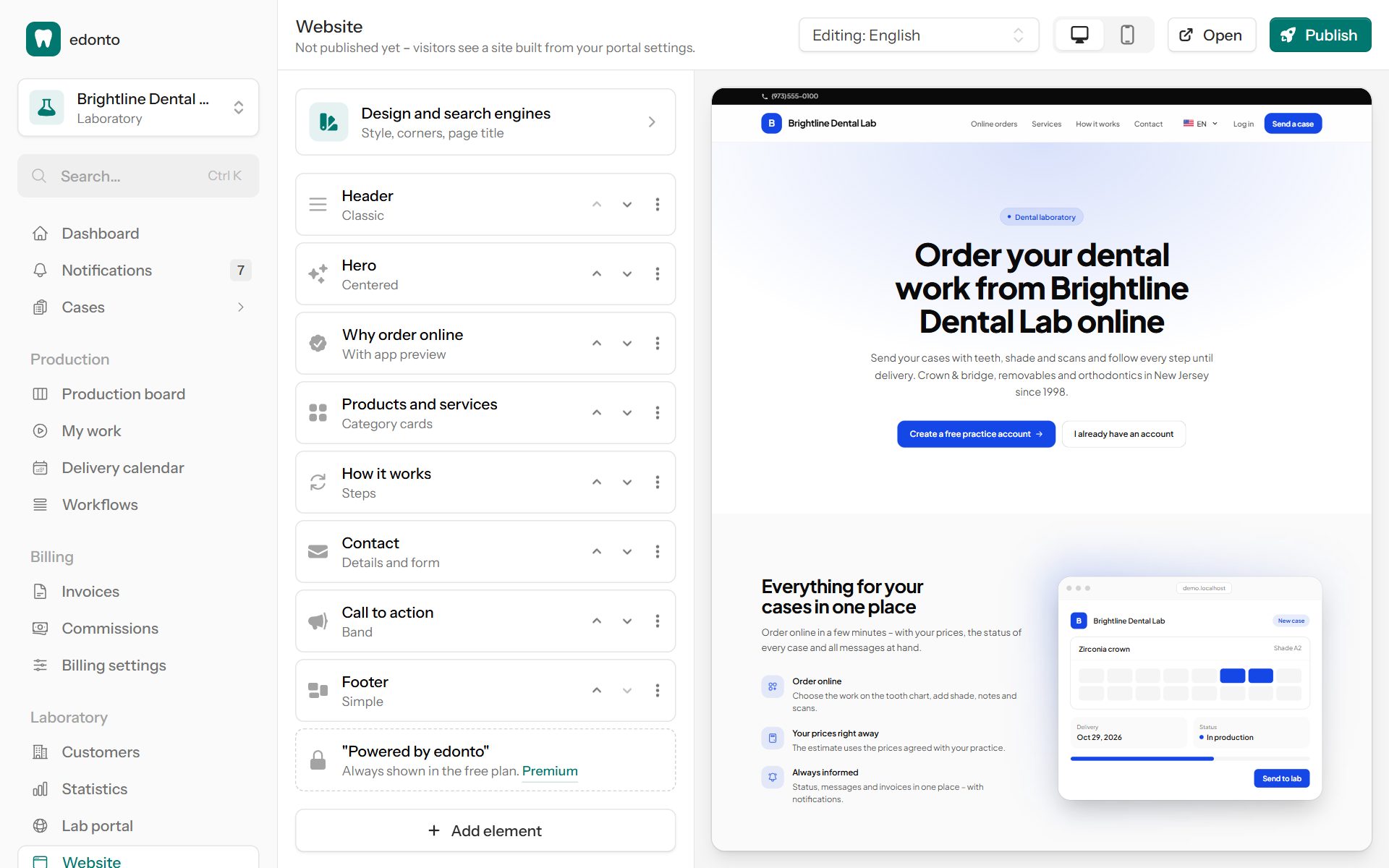
Your lab portal's start page is a complete website: header, a large first section, what practices gain from ordering online, your products with Send a case, contact form, footer and more. You build it yourself from ready-made elements – no design skills or agency needed. Owners and administrators open it under Laboratory → Website or with Edit website on the Lab portal page.
Until you publish your own version, visitors see a site built from your portal settings: your headline and welcome text, your products and your contact data – in every language.
Elements
On the left you see All elements of the page from top to bottom. Select one to edit it; the preview on the right shows your changes immediately.
- Add element offers header, hero, why order online, products and services, about us, how it works, gallery, testimonials, questions and answers, call to action, contact and footer.
- Under More you can Move up, Move down, Duplicate, Hide (it stays saved but isn't shown) or Remove an element.
- Every element has a Layout – for example Cards, Icons in a row, With app preview (a drawn view of your portal in your color and with your name) or List beside a photo – and a Background: white, light grey, light brand color, brand color or dark.
- A Menu entry puts the element into the menu of the header; leave it empty to keep it out of the menu.
- Photos are scaled down automatically. Use your own photos of your lab and your work.
Products and services lists your active products by category. Send a case opens a new case with that product for practices that are signed in – others are invited to create an account.
The Contact element shows your address, phone, email, opening hours and WhatsApp, and optionally a Contact form: messages are sent to your organization's email (Settings → General), and you can reply directly to the visitor.
Languages
Choose the Language you are editing at the top. Visitors see the texts in their language; where a text is missing, they see it in your lab's language, then in English. New elements come with sample texts in every language – replace them with your own.
Design and search engines
Under Design and search engines you choose the Style (fonts: Modern, Classic (serif headings), Clean or Friendly) and the Corners (Round, Soft or Square). Your brand color and logo come from the Lab portal settings.
Page title and Description are shown by Google and when the link is shared, e.g. on WhatsApp.
Privacy policy
Your website needs a privacy policy, e.g. for the contact form. It is linked in the footer. Until you write your own, visitors see a template with your lab's details. Select Use template to copy it into the editor, check it and adapt it to your lab – you are responsible for its content.
Preview and publish
Switch the preview between Desktop and Phone. Changes are saved as a draft automatically; visitors only see them after you select Publish. Discard brings back the last published version.
In the free plan, "Powered by edonto" is always shown at the end of the page. With Premium and a white-label portal it disappears, and you can use a domain of your own (Lab portal).